Mission control for your mind
A calm ADHD-friendly task app for overwhelmed minds.
Drop everything in. Choose what needs you now and quietly park the rest. Built for ADHD brains.
Open Orbit 6Free public beta. No account. Opens www.orbit-6.app.
See a small example01 / A gentler orbit
Everything can be somewhere.
Not everything has to be now.
One small next move stays close. The rest remains safely in view, without becoming noise.
02 / A little less to hold
A place for the thought.
A smaller way to start.
- NOW
- Open the report and write one heading.
- NEAR
- Keep the email nearby for when you return.
- FAR
- Let the cupboard idea wait without losing it.
See the report example, step by step
Capture: “The report feels too big, I need to reply to an email, and the cupboard needs sorting.”
Now: open the report and write a working heading. Near: reply to the email. Far: keep the cupboard idea for later.
This is an illustration, not an AI response. Nothing in this example is saved or sent.
03 / Built around you
Less pressure.
More space to begin.
Capture tasks, ideas and worries in Command Centre. Today brings current work into view. A Mission Window gives one task a little room, with a focus timer and optional companion scenes.
- 01
No account, no sign-up
- 02
Local Mode works offline after loading online
- 03
No streaks, no nagging, no shame
Adjust text size, motion and sensory settings. Airlock and Star Bay offer places to pause. Optional Smart Mode can help organise submitted text.
Explore how Orbit 6 works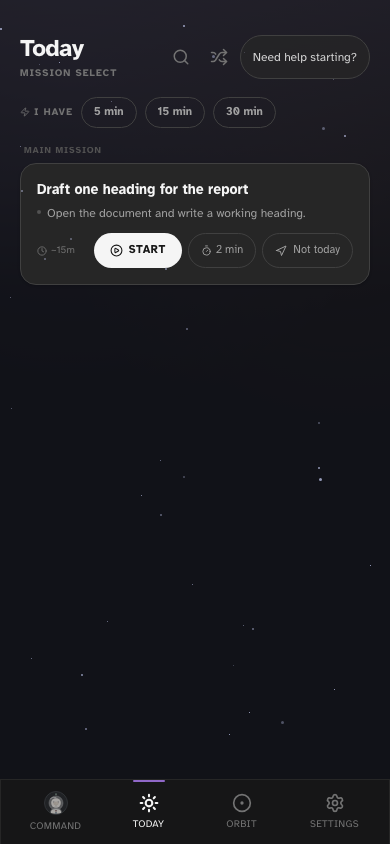
04 / Your own orbit
In your browser.
On your terms.
No account is needed. Your tasks live in this browser; there is no automatic cloud backup or cross-device sync. Export a full backup in Settings → Data before clearing browser data or moving devices.
Smart Mode sends submitted text to an AI service when used. Local Mode captures without that request. Read how data is handled ↗
Used the previous .com app? Its records remain separate from the current .app app. This website does not delete or automatically migrate them. Read the previous-app data note.
05 / Small, practical starting points
You do not need
a perfect system.
How to start a task when you feel overwhelmed
Turn an overwhelming task into a visible first action. Includes everyday examples, a small-step template and a way to restart after a pause.
How to plan a low-energy day
Make a smaller plan for a low-energy day: check real commitments, choose one useful action and leave a return note. Includes a worked example.
How to organise a brain dump into one next action
A brain dump does not need to become another huge to-do list. Use a worked sorting example and a copyable template to choose one next action.
06 / Before you begin
A few practical answers.
Is Orbit 6 free, and do I need an account?
The current public beta is free to try, with no account or payment required. There is no paid Commander plan in the current app.
Can I use Orbit 6 offline?
Local Mode can capture after the app has loaded online. Smart Mode needs an internet connection and sends submitted text to an AI service. See how the two capture modes work.
Does it sync between my phone and computer?
No. Tasks stay in the browser profile where you use the app. Export a full backup in Settings → Data before clearing site data or moving devices. Read the storage and backup details.
Where should I start if my task list feels overwhelming?
Try the small first-action guide for one stuck task, or the brain-dump example for a mixed list. Both work without an app or sign-up.
Your orbit is waiting
Start with one
real thought.
Try the free public beta. No waiting list.
Orbit 6 is a productivity tool, not a medical treatment.